


Mastering the Art of WordPress Theme Submission: A Guide by Ariyan Islam Raj
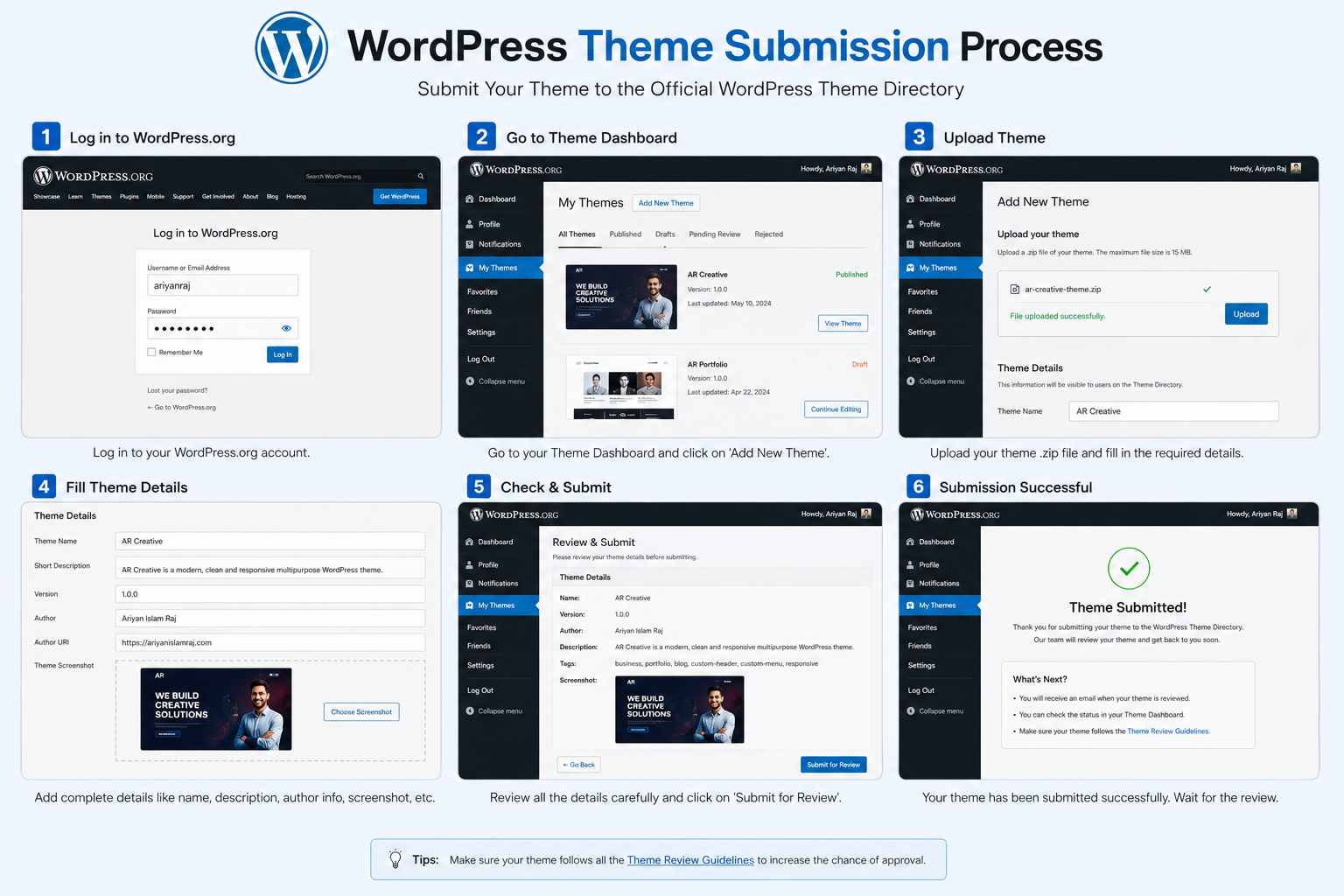
Outline: Mastering the Art of WordPress Theme Submission
Table of Contents
Mastering the Art of WordPress Theme Submission: A Guide by Ariyan Islam Raj
Introduction: Why WordPress Theme Submission Matters
Have you ever wondered what separates a great WordPress developer from an exceptional one? One word — submission. Not in the passive sense, of course, but in the context of submitting your beautifully crafted WordPress theme to the official WordPress theme repository. Think of it like submitting your masterpiece painting to a prestigious art gallery. If accepted, the world gets to see and use your work. If rejected, you learn and come back stronger.
WordPress powers over 43% of all websites on the internet, and behind every great WordPress site is a thoughtfully designed theme. Whether you’re a beginner developer looking to make your mark or an experienced coder wanting to give back to the community, submitting a theme to the WordPress directory is a milestone worth achieving.
In this comprehensive guide inspired by the expertise of Ariyan Islam Raj, a seasoned WordPress developer and theme submission expert, we’ll walk you through every step of the process — from conception to approval. Buckle up, because this is going to be a full-throttle ride through the world of WordPress theme development and submission.
Who Is Ariyan Islam Raj?

Before we dive into the nitty-gritty, let’s talk about the man behind this guide. Ariyan Islam Raj is a highly regarded WordPress developer and digital creator known for his expertise in WordPress theme development, plugin customization, and web design strategy. With years of hands-on experience navigating the WordPress theme review process, Ariyan has helped countless developers get their themes approved and recognized in the global WordPress community.
His philosophy is simple — build with purpose, code with passion, and submit with confidence. His practical, no-fluff approach to WordPress theme submission has made him a trusted voice in the developer community. This guide is a reflection of his accumulated wisdom, distilled into actionable steps that you can follow right now.
Understanding the WordPress Theme Repository
What Is the WordPress Theme Directory?
The WordPress Theme Directory (also known as the WordPress.org theme repository) is the official marketplace where free WordPress themes are hosted, reviewed, and distributed. It’s a massive library of thousands of themes — all free, all vetted, and all accessible to millions of WordPress users worldwide.
When you download a theme directly from your WordPress dashboard, that theme comes straight from this directory. It’s like the App Store or Google Play, but exclusively for WordPress themes and totally free.
Why Submit Your Theme to the Official Repository?
Here’s the deal — submitting your theme to the official repository isn’t just about sharing code. It’s about credibility, visibility, and community contribution. When your theme is listed in the directory:
- Millions of users have access to it
- Your name (and brand) gains recognition
- You contribute positively to the open-source WordPress ecosystem
- It opens doors to freelance work, partnerships, and monetization opportunities
Think of it as getting a verified badge on social media — it signals trust and authority.
Prerequisites Before You Start Submitting
Essential Skills You Need
Before you even think about hitting that “submit” button, you need to make sure your development toolkit is fully loaded. Ariyan Islam Raj always emphasizes preparation over perfection, but some baseline skills are absolutely non-negotiable:
- Solid understanding of HTML5, CSS3, and JavaScript
- PHP knowledge (WordPress is PHP-based, after all)
- Familiarity with WordPress template hierarchy
- Basic understanding of accessibility standards (WCAG)
- Knowledge of GPL licensing (all themes must be GPL-compatible)
Don’t worry if you’re not a wizard at all of these — the key is knowing enough to write clean, secure, and functional code.
Tools Required for Theme Development
Every craftsman needs their tools, right? Here are the essentials you’ll want in your arsenal:
- Local development environment (LocalWP, XAMPP, or DevKinsta)
- Code editor (VS Code is the gold standard)
- Theme Check Plugin — a must-have for pre-submission testing
- Browser developer tools for responsiveness testing
- Git for version control
Building a WordPress Theme That Passes Review
Following WordPress Coding Standards
Here’s where a lot of developers trip up. The WordPress community has a set of WordPress Coding Standards (WPCS) — a collection of best practices for writing clean, consistent PHP, HTML, CSS, and JavaScript code. Reviewers check your code against these standards, so ignoring them is like showing up to a formal dinner in flip-flops.
Key coding standards include:
- Proper indentation and spacing
- Using WordPress core functions instead of custom workarounds
- Sanitizing, escaping, and validating all data inputs and outputs
- Avoiding deprecated functions
Tools like PHP_CodeSniffer with WordPress standards can automatically flag coding standard violations before you submit.
Ensuring Theme Security
Security isn’t optional — it’s mandatory. Ariyan Islam Raj often says, “A theme with security holes isn’t a theme; it’s a liability.” Here’s what reviewers look for:
- Escaping output (use
esc_html(),esc_url(),esc_attr()) - Sanitizing input (use
sanitize_text_field(),wp_kses()) - Nonces for form submissions
- No direct PHP file access without protection
The WordPress Theme Review Process Explained
How the Review Queue Works
Once you submit your theme, it enters a review queue managed by volunteer reviewers from the WordPress community. The waiting time can vary from a few weeks to several months, depending on the volume of submissions. Think of it like waiting at a busy restaurant — patience is your best friend here.
The review process is divided into:
- Initial automated checks via the Theme Check plugin
- Manual human review by a WordPress theme reviewer
- Feedback loop — reviewers leave comments and you revise
- Final approval — your theme goes live in the directory
Common Reasons Themes Get Rejected
Rejection is not the end — it’s a learning opportunity. Here are the most frequent reasons themes get kicked back:
- Not following GPL licensing requirements
- Security vulnerabilities (unescaped output, unsanitized input)
- Missing required files (like
style.csswith proper headers) - Using outdated or deprecated WordPress functions
- Including unnecessary JavaScript libraries
- Lack of proper accessibility support
Knowing these pitfalls in advance is like having a map before entering a maze.
Step-by-Step Guide to Submitting Your WordPress Theme
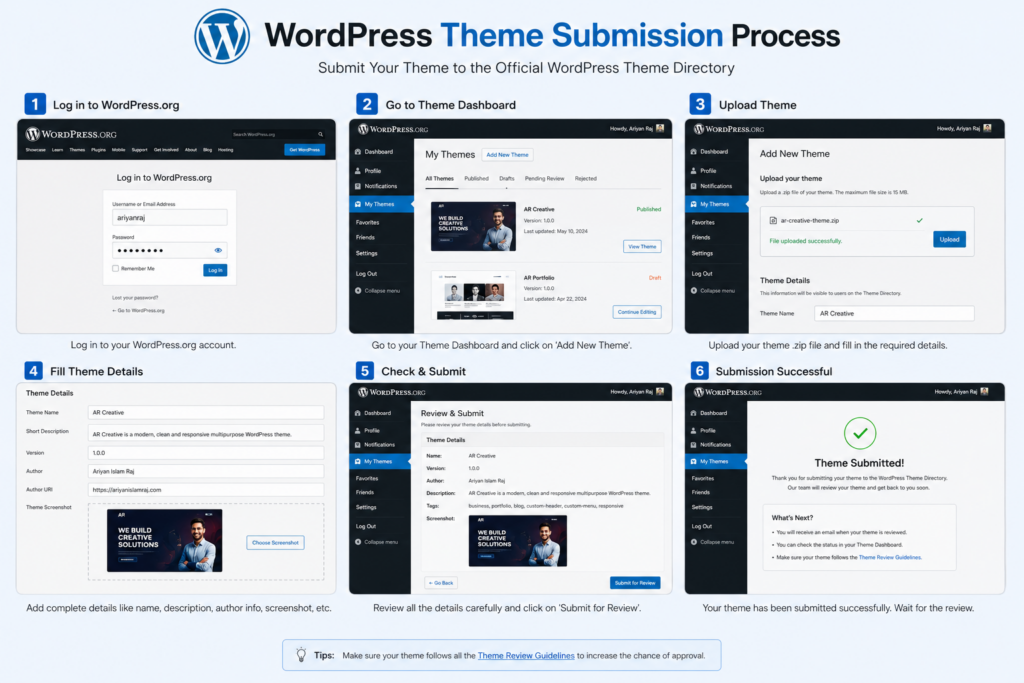
Ready for the main event? Here’s Ariyan Islam Raj’s proven, step-by-step submission process:
Step 1: Create a WordPress.org account — You need an account at WordPress.org to submit themes. It’s free and takes two minutes.
Step 2: Run the Theme Check plugin — Install it on your local development site and run it against your theme. Fix every error and warning before moving forward.
Step 3: Zip your theme folder — Compress your theme into a .zip file. Make sure the folder name matches the theme slug.
Step 4: Visit the Theme Upload Page — Head to wordpress.org/themes/upload and upload your .zip file.
Step 5: Submit and wait — After upload, your theme enters the review queue. You’ll receive email notifications when a reviewer leaves feedback.
Step 6: Respond to feedback promptly — Don’t let reviewer comments sit unanswered. Engage, fix, and resubmit quickly.
Step 7: Celebrate approval — Once approved, your theme goes live. Announce it, promote it, and keep updating it!
Key Files Every WordPress Theme Must Include
Let’s break down the must-have files in any WordPress theme submission:
style.css— Contains theme header information (name, author, version, license)index.php— The main template filefunctions.php— Theme setup, hooks, and feature registrationheader.phpandfooter.php— Structural template partsscreenshot.png— A 1200×900 pixel image showing the theme previewreadme.txt— Documentation and changelog
Missing any of these is like submitting a job application without your resume — it just won’t work.
Accessibility and Responsiveness Standards
Modern WordPress themes must be accessible and responsive. Accessibility means your theme works for people with disabilities — screen readers, keyboard navigation, high contrast modes — all need to function properly.
Ariyan Islam Raj emphasizes using semantic HTML5 elements (<header>, <main>, <nav>, <footer>) and ensuring sufficient color contrast ratios. Responsiveness means your theme looks great on mobile, tablet, and desktop — verified through tools like Google’s Mobile-Friendly Test.
Testing Your Theme Before Submission
Testing is where the magic (or disaster) reveals itself. Before submitting, run these critical tests:
- Theme Unit Test Data — Import the official WordPress theme unit test data to see how your theme handles various content types
- Cross-browser testing — Check Chrome, Firefox, Safari, and Edge
- W3C Validation — Validate your HTML and CSS
- Accessibility testing — Use tools like WAVE or axe DevTools
- Performance testing — Use GTmetrix or PageSpeed Insights
Think of testing as the dress rehearsal before the big performance.
Dealing with Reviewer Feedback
Getting feedback from a theme reviewer can feel like receiving a report card you weren’t ready for. But here’s the truth — reviewer feedback is gold. These are experienced developers pointing out real issues in your code.
Ariyan’s advice? Stay humble, stay professional, and stay focused. Read every comment carefully. If something isn’t clear, ask politely for clarification. Never argue with reviewers — they’re volunteers helping you improve.
Create a checklist from the feedback, tackle each item methodically, update your theme version number, and resubmit. Rinse and repeat until you get that sweet approval notification.
Tips and Tricks from Ariyan Islam Raj
Here are some exclusive insider tips from Ariyan Islam Raj himself:
- Start with a simple, clean theme — Complex themes have more room for errors. Start minimal.
- Study approved themes — Look at recently approved themes in the repository for current standards.
- Join the WordPress Slack — The
#themereviewchannel is where you can get real-time help. - Document your code — Inline comments make reviewer’s jobs easier and show professionalism.
- Use a child theme for testing — Never risk breaking your main theme during development.
- Keep your screenshot professional — First impressions matter. A clean, attractive screenshot can draw users in.
Monetizing Your Approved WordPress Theme
Getting approved is just the beginning. The real question is — how do you turn a free theme into income?
Here are some proven strategies:
- Freemium model — Offer a free lite version in the repository and a premium version on your own site
- Theme documentation services — Charge for premium support and documentation
- Custom development — Use your approved theme as a portfolio piece to win freelance clients
- Donations — Add a “Buy me a coffee” link to your theme’s page
- Sponsored themes — Partner with brands who want exposure through your theme
Common Mistakes to Avoid During Submission
Let’s cap off the technical stuff with a quick fire round of common rookie mistakes:
- Submitting without running the Theme Check plugin
- Using
//for comments in PHP (use/* */or#) - Hardcoding URLs instead of using WordPress functions
- Not updating the version number when resubmitting
- Uploading a demo content database in the theme zip
- Forgetting to include a valid license in
style.css
Avoid these, and you’ll already be ahead of 50% of first-time submitters.
Conclusion
Mastering the art of WordPress theme submission is genuinely one of the most rewarding journeys you can take as a WordPress developer. It’s not just about writing code — it’s about crafting an experience, meeting community standards, and contributing something meaningful to millions of users worldwide. With the guidance of experts like Ariyan Islam Raj, the path from “first draft” to “approved theme” becomes less intimidating and a whole lot more achievable.
Remember, every approved theme in the repository started exactly where yours is right now — as an idea, a passion project, a first attempt. The key is to learn, iterate, and never give up. So start building, start testing, and start submitting. Your WordPress legacy begins today.
FAQs
1. How long does the WordPress theme review process take?
The review process can take anywhere from a few weeks to several months, depending on the current volume of submissions. Keeping your theme error-free before submission speeds up the process significantly.
2. Can I submit multiple themes to the WordPress directory at the same time?
No. WordPress.org allows developers to have only one theme in the review queue at a time. Focus on getting one theme approved before submitting another.
3. Does my theme need to be completely original to be accepted?
Yes, your theme must be your original work. Using starter themes or frameworks is allowed, but you cannot submit themes that are simply copies or minor modifications of existing themes without substantial changes.
4. What happens if my theme gets rejected?
Rejection is not permanent. Reviewers leave detailed feedback explaining what needs to be fixed. Once you address all issues and update your theme, you can resubmit it for review.
5. Can I charge for a theme listed on the WordPress.org directory?
No. All themes in the official WordPress.org directory must be free. However, you can use a freemium model — offering a basic free version in the directory and a premium paid version on your own website.